Advent of code in SPL - 2025 day 2

Updated: Jan 26
(Edited to use mvrange)
Day 2 of the 2025 advent of code challenges is here: https://adventofcode.com/2025/day/2 You won't be able to do it if you haven't done day 1 first.
We can break down this challenge in several steps:
given a range (e.g. 11-22), enumerate all the IDs within the range (e.g. 11,12,13,...,22)
given a number, assess whether it's made of 2 repeated halves
somehow do this for all the ranges all together to get the solution
Step 1
For this challenge, we'll start small. Let's just take the first range:

Now how do we enumerate all these numbers? I would love to hear of other approaches, but for some reason my brain went straight to the makecontinuous command. First let's create 2 separate events with the boundaries:

The makecontinuous command will create missing events:

Quick aside: makecontinuous
I discovered the makecontinuous command when I wanted to make a column chart that visually shows the distribution of some value. Consider the following set of random-ish values:

I first naively started with:
Which looks like it does what I want:

But some values are not represented (e.g. 5) and visually that's not conveyed at all. Enter makecontinuous:
Now the visualisation is much more truthful:

End of the aside!
Step 2
We can move on to the next part of the challenge: is it made of two identical halves? Looking at the other ranges, we can see the number of digits in the IDs vary considerably, it's certainly not always 2 like here, so we need to get the length. And then divide it by 2 to get the length of a half:

Note: as soon as we even think of dividing the length by two, a light should go on in our brain that this does not make sense for odd-length IDs, so we might as well get rid of them, here with the where command.
Now it's just a matter of extracting each half. The difficulty here is just to figure out the correct syntax (index starting at 0 or 1? it's not always consistent across commands):

Now we're talking! Here's the full search, giving us the right answer:

Which in this case is the same as what we started with... But we can update line 2 here with various ranges from the examples and check that it works for all of them, with larger numbers, bigger ranges, etc:

Step 3
Now, can we iterate over all the ranges? The data for this challenge only has 30 ranges, so we could potentially manually run 30 searches and collate the result together manually and weakly claim that we solved the challenge in SPL. But we can actually do better with map. Now I don't recommend using map for much at all, but in cases when you know for sure quantities are reasonable and the repeated search isn't heavy, it can be very powerful.
Let's first try with the example ranges. Let's copy-paste them quickly in a run-anywhere search:

Now let's use map to run our solution:

Note: I initially didn't specify the maxsearches option and splunk complained there was 11 searches to run which is more than the 10 default limit (again, map is great when you really need it, but it's definitely not scalable to millions, beware).
Amazingly this works perfectly, just need to sum them up:

At this point I was patting myself on the back and feeling quite chuffed. Little did I know I had to overcome yet another obstacle...
Now on the real challenge data
I quickly saved the challenge data to a csv file, edited it with a text editor to add a single line at the top saying "id_ranges", and uploaded that as a new lookup:
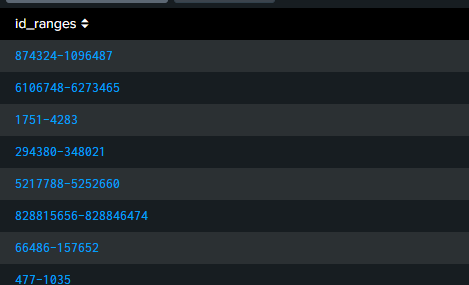
And I went and did:
But splunk was not happy:

It turns out that makecontinuous has limits and some of the ID ranges in the challenge data contain way more than 50,000 IDs! That was a big setback. Now a potential solution would be to get an admin (e.g. myself) to increase the limit, assuming it's configurable. But that's not the spirit.
First step is always to investigate the extent of the problem:

Note: if you don't like rex, you could also do:
Looks like the biggest ID range is "only" 5 times bigger than the maximum... are you thinking what I'm thinking? Can we split the bigger ranges into multiple smaller ranges? Of course we can. First, find out how many sets we need per range:

Now, we need to create more events as needed. There might be a better way than this (please get in touch!), but my mind goes to mvexpand. I just need to create a dummy multivalue with the right number of values...! The proper way to do that is to use mvrange (and we will in a bit) but I had a blindspot and didn't know about mvrange initially, so instead I cheated with this (a bit gore):

Did you follow that? Of course it's not exactly what I would call robust and scalable, but here we're getting away with it. So let's create these extra events with mvexpand:

Now all the duplicated events are actual duplicates... how are we going to distinguish them? With streamstats of course! See the day 1 article where streamstats was the hero.

Now as I said earlier, the proper way to get to the same place would be:
Now we just need to recreate the broken-down ranges using rank:

All we need now is to put it together:

We should be able to plug in our solution and get the answer:
Wow, what a journey!
Now what did we learn from this?
makecontinuous is definitely what you need in some cases, though here we really abused it
map is great if you can guarantee the number of iterations is small and the subsearch lightweight, but where possible you should approach your goal differently so you don't have to use it
mvrange is very useful but otherwise streamstats is always a winner when massaging data
hitting limits is no fun, and usually means you should find another solution, but in our case we were able to work around the makecontinuous limits without overloading map
Now, believe it or not that was only part 1 of day 2...!
Part 2 of the challenge
Thankfully we can reuse most of the work from part 1, we just need to change the assessment of what's an ID of interest.
I guess we could implement variants of what we did in part 1: try dividing the ID in 2, but also in 3, in 4, etc, and then keep it if any of the divisions turns out a repeat. But in this case my brain went straight to regular expressions. You can put part of a regex between brackets () and it becomes a captured group. Whatever that part of the pattern matches can be referred back to. This is often used in the replacement part of a replace command, but did you know it can also be used /within the regex itself/ to express a repetition of the pattern? Consider the following regex:
^(.)\1+$
The . matches the first digit of the ID (because of ^) and it gets captured in the first capturing group (because of the () brackets). Then \1 refers back to the content of the first capturing group and + repeats it at least once until the end $ of the ID. So this will match IDs like 11 or 111 or 1111, etc.
We can update the capturing group to capture more than one character:
^(..)\1+$
This will match IDs like 2323, 232323, etc.
I have to admit initially I solved the challenge with this regex:
^(.)\1+$|^(..)\2+$|^(...)\3+$|^(....)\4+$|^(.....)\5+$
Note how I now have multiple capturing group so I need to refer to the correct one each time instead of \1 all the time. The issue with this regex (besides its lack of elegance) is that it's not scalable. It won't match 123456123456 for instance. Now that I'm writing this, I've actually realised that you can just do:
^(.+)\1+$
And it works!
So the solution of part 2 is now:
What a challenge! Hope you enjoyed the ride.
By the way, I'm not trying to convince you to ditch python and do everything in SPL. I'm just making the point that if you have data in splunk, and you are careful and crafty, you can maybe do more with it with SPL than you think.
As usual, please hit me up with alternative solutions, I'd love to learn from you: me@gabrielvasseur.com


Comments